> ## Documentation Index
> Fetch the complete documentation index at: https://docs.denari.com/llms.txt
> Use this file to discover all available pages before exploring further.
# Edit attributes
> Change the fields that decide where a document lives and how it is found.
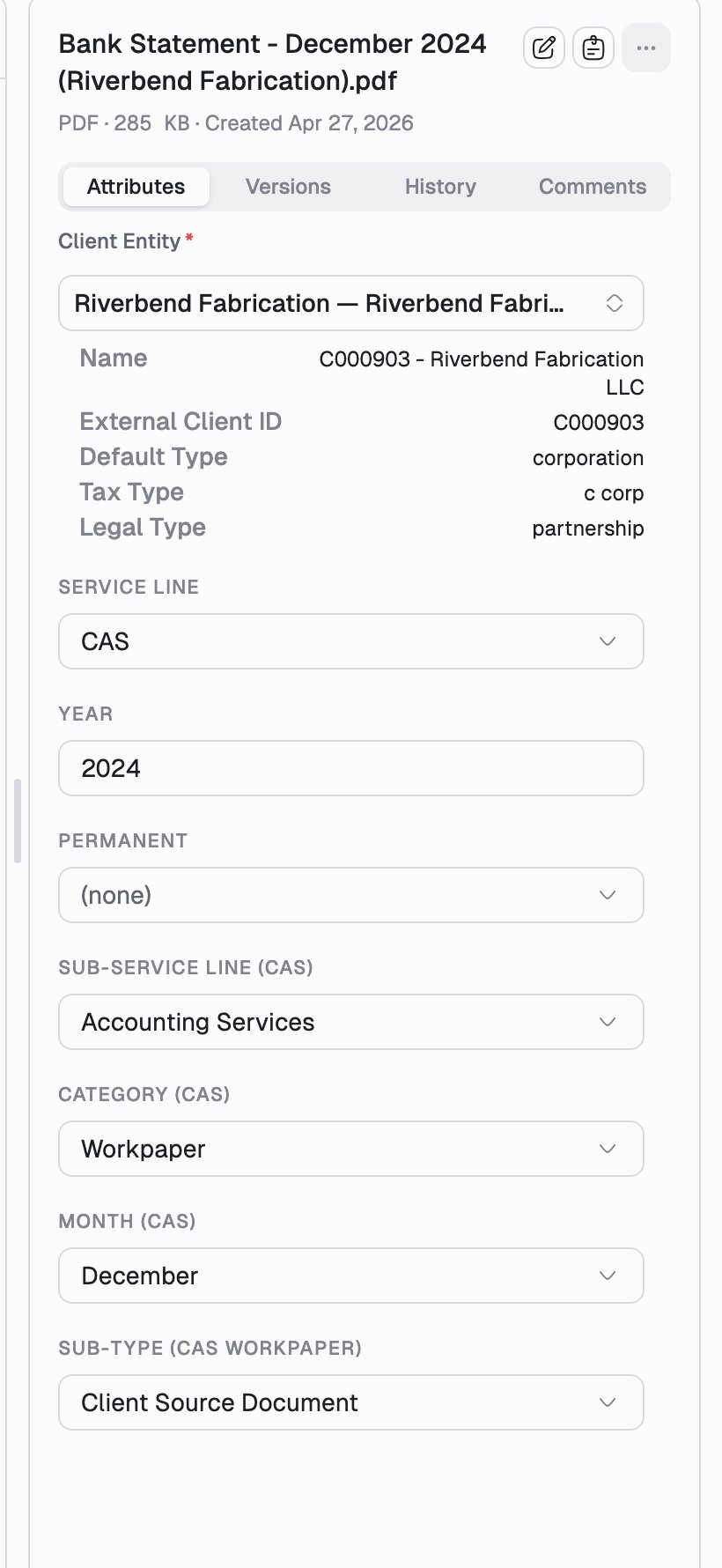
Attributes are the structured fields that describe a document: client entity, service line, year, category, and any custom fields your firm defines. They replace folders, so getting them right is what makes a document findable.
 ## Edit them
Attributes live on the **Attributes** tab of the details pane, on both the
list page and the document page.
Fields marked with a red asterisk are required. Picking a client entity
fills in its read-only details (external client ID, entity type, tax type)
below.
A **Save** button appears at the bottom of the form as soon as something is
unsaved. Nothing is written until you click it.
Some fields cascade. Choosing a service line reveals the sub-service line,
category, and sub-type fields that belong to it, so the form only ever shows
fields that apply. A **+** badge next to a dropdown option tells you it will
add fields before you pick it.
## Rename a document
Click the filename at the top of the details pane to rename it in place, or use **Rename** in the `...` actions menu. The extension is kept for you.
## Good to know
* Attributes belong to the **document**, not to a version, so they carry across new versions and never need re-entering after a replacement upload. See [Versions](/documents/versioning).
* The **client entity** is what decides which client portal a document can be published to, so it is worth getting right even on documents you don't expect to share. See [Publish a document](/portals/publish).
* Saved changes flow through to search, grouping, and filters.
* If your firm is in a read-only or imported-content mode, the fields render but cannot be edited, and a banner at the top of Documents explains which actions are disabled.
Consistency beats completeness. A small, shared set of attributes that
everyone fills in the same way makes [search](/documents/search) and grouping
far more powerful than a large set filled in loosely.
This documentation is built and hosted on [Mintlify](https://mintlify.com), a developer documentation platform.
## Edit them
Attributes live on the **Attributes** tab of the details pane, on both the
list page and the document page.
Fields marked with a red asterisk are required. Picking a client entity
fills in its read-only details (external client ID, entity type, tax type)
below.
A **Save** button appears at the bottom of the form as soon as something is
unsaved. Nothing is written until you click it.
Some fields cascade. Choosing a service line reveals the sub-service line,
category, and sub-type fields that belong to it, so the form only ever shows
fields that apply. A **+** badge next to a dropdown option tells you it will
add fields before you pick it.
## Rename a document
Click the filename at the top of the details pane to rename it in place, or use **Rename** in the `...` actions menu. The extension is kept for you.
## Good to know
* Attributes belong to the **document**, not to a version, so they carry across new versions and never need re-entering after a replacement upload. See [Versions](/documents/versioning).
* The **client entity** is what decides which client portal a document can be published to, so it is worth getting right even on documents you don't expect to share. See [Publish a document](/portals/publish).
* Saved changes flow through to search, grouping, and filters.
* If your firm is in a read-only or imported-content mode, the fields render but cannot be edited, and a banner at the top of Documents explains which actions are disabled.
Consistency beats completeness. A small, shared set of attributes that
everyone fills in the same way makes [search](/documents/search) and grouping
far more powerful than a large set filled in loosely.
This documentation is built and hosted on [Mintlify](https://mintlify.com), a developer documentation platform.