> ## Documentation Index
> Fetch the complete documentation index at: https://docs.denari.com/llms.txt
> Use this file to discover all available pages before exploring further.
# Preview
> Read a document without leaving the list, and arrange the workspace to suit the job.
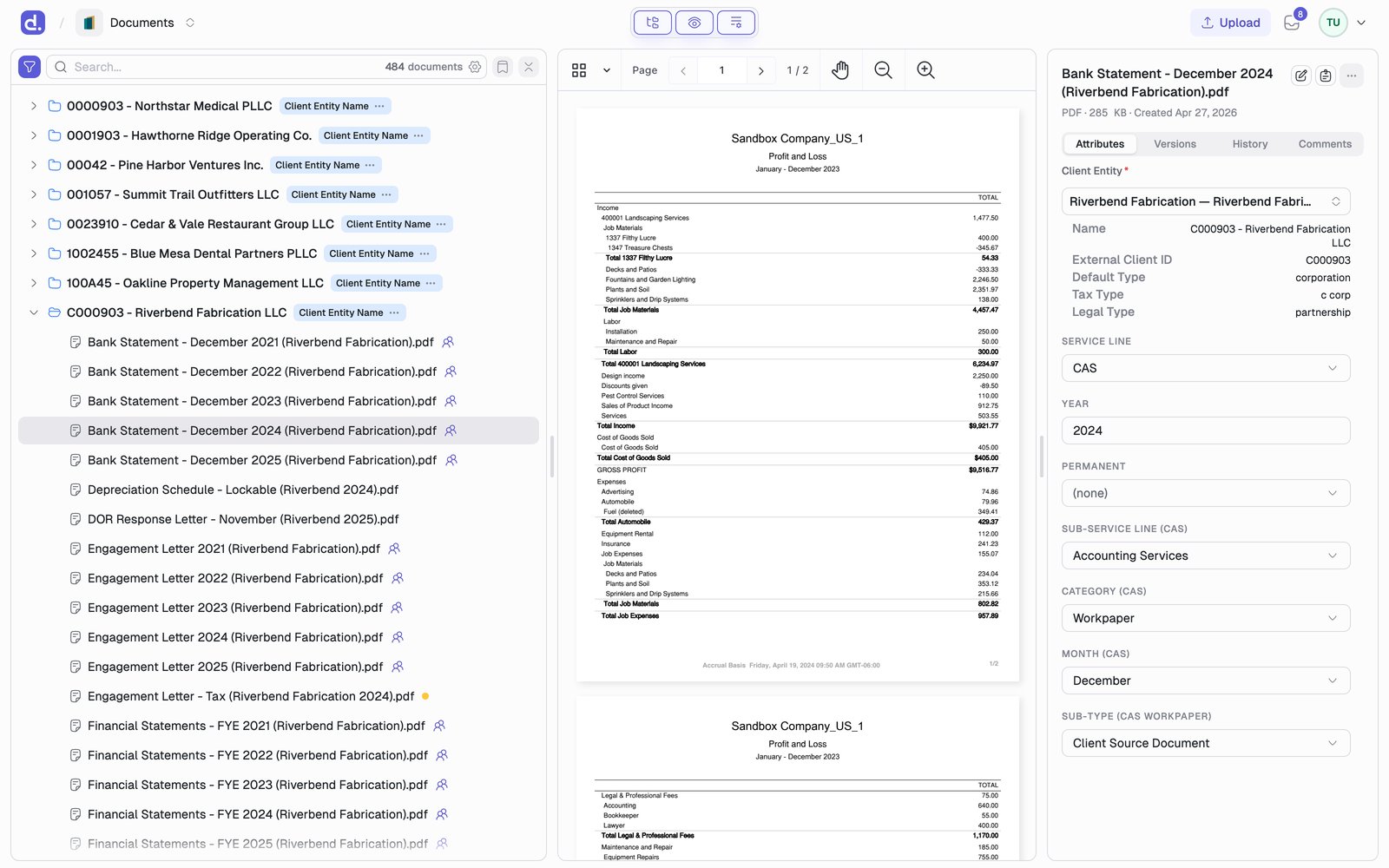
Selecting a document previews it beside the list, so you can scan a client's file without opening and closing pages.
 ## Open a preview
* **Single-click** a document row to preview it.
* **Double-click** it to open the full document page.
* With the tree focused: **↑** and **↓** move, **→** and **←** expand and collapse a group, **Enter** previews the highlighted document, **Home** and **End** jump to the ends.
Preview supports **PDF**, **TIFF**, **Excel** (`.xlsx`), and **Word** (`.docx`).
## Viewer controls
Along the top of the preview: a thumbnail and outline menu, page navigation with the page count, a pan tool, and zoom in and out.
## Arrange the panes
The workspace has three panes: **list**, **preview**, and **details**. Toggle each one from the control in the header.
## Open a preview
* **Single-click** a document row to preview it.
* **Double-click** it to open the full document page.
* With the tree focused: **↑** and **↓** move, **→** and **←** expand and collapse a group, **Enter** previews the highlighted document, **Home** and **End** jump to the ends.
Preview supports **PDF**, **TIFF**, **Excel** (`.xlsx`), and **Word** (`.docx`).
## Viewer controls
Along the top of the preview: a thumbnail and outline menu, page navigation with the page count, a pan tool, and zoom in and out.
## Arrange the panes
The workspace has three panes: **list**, **preview**, and **details**. Toggle each one from the control in the header.

 `⌘\` (`Ctrl+\`) cycles the three common layouts: all panes, list and preview,
list only. Drag the dividers to resize; Denari remembers your split.
## What is in the details pane
The right pane holds everything about the selected document: [Attributes](/documents/attributes), [Versions](/documents/versioning), **History** (an audit log of who viewed, edited, locked, or commented, and when), and **Comments**.
This documentation is built and hosted on [Mintlify](https://mintlify.com), a developer documentation platform.
`⌘\` (`Ctrl+\`) cycles the three common layouts: all panes, list and preview,
list only. Drag the dividers to resize; Denari remembers your split.
## What is in the details pane
The right pane holds everything about the selected document: [Attributes](/documents/attributes), [Versions](/documents/versioning), **History** (an audit log of who viewed, edited, locked, or commented, and when), and **Comments**.
This documentation is built and hosted on [Mintlify](https://mintlify.com), a developer documentation platform.