> ## Documentation Index
> Fetch the complete documentation index at: https://docs.denari.com/llms.txt
> Use this file to discover all available pages before exploring further.
# Pipeline & referral sources
> Track prospects through your sales stages, and keep tabs on who sends you business.
**The Pipeline tracks possible clients through your sales stages, and a deal is won by turning on its engagement.** Referral sources track who sends you the business.
## The board
Each deal is a card in a stage column.
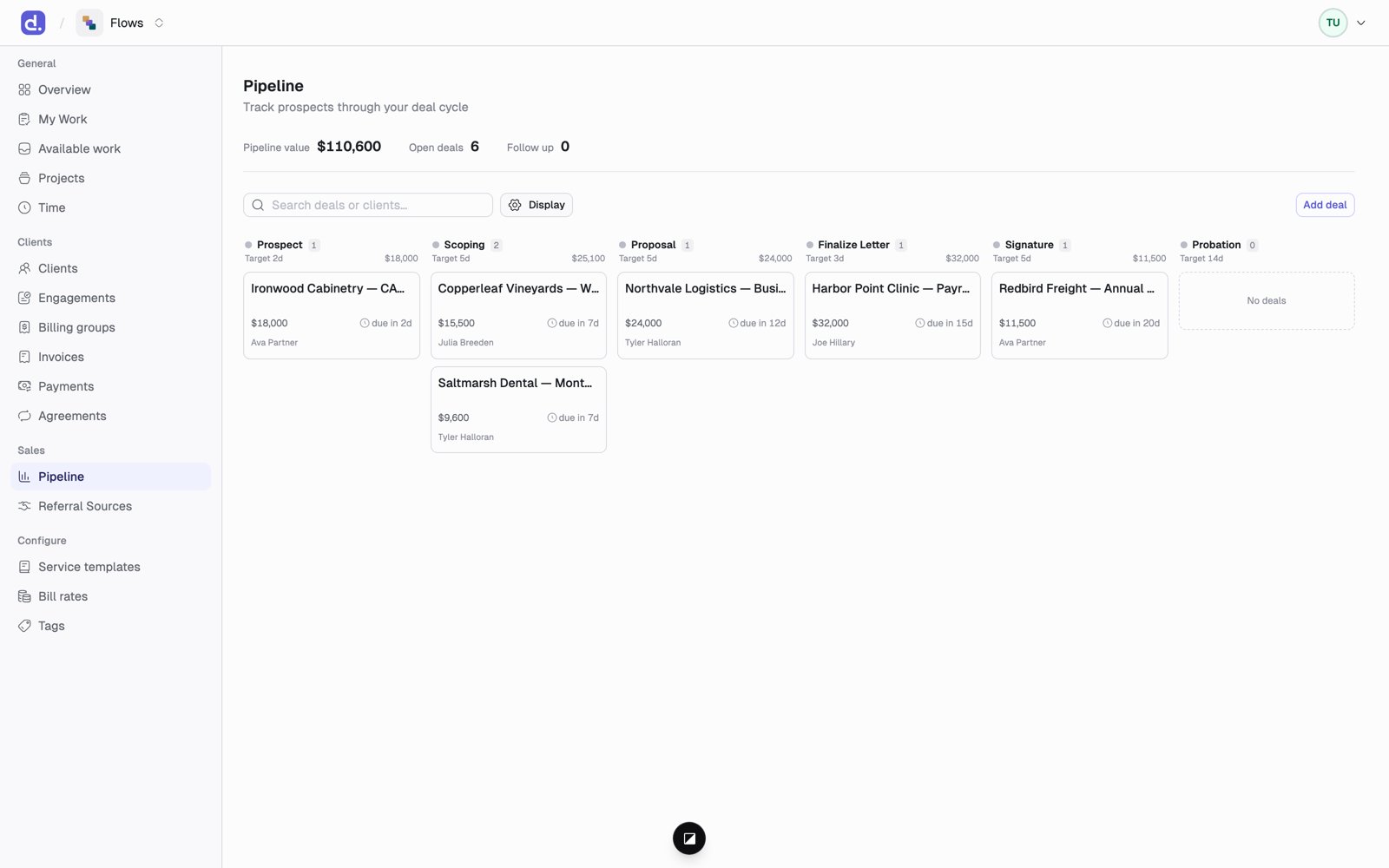 * **Drag a card** to move it to another stage. Each stage has its own checklist.
* Cards show when they're due. A card is flagged **Follow up** when it's near the end of its time in a stage, or overdue.
* The top of the page shows **Pipeline value**, **Open deals**, and **Follow up** counts.
* To close a deal you didn't win, drop it on **Lost** or **Cancelled** and add a reason if you like.
Your firm's stages and their checklists are configurable. Flows ships with
**Prospect → Scoping → Proposal → Finalize Letter → Signature → Probation**,
each with its own target number of days.
## Add a deal
Click **Add deal** and fill in the name, the client (or leave it as a raw lead), the lead, who referred it, the expected value, the expected close date, and the probability.
## From deal to engagement
Open the deal and click **Create engagement** (admins only). The engagement wizard opens with the client filled in. When that engagement is activated, the deal is marked **Won** on its own.
**Won happens this one way only.** You can't drag a card into Won. And a deal
only carries the *client* into the engagement; you add the services and prices
in the wizard.
## Referral sources
**Referral Sources** keeps track of the people and channels that send you business.
* A source is either a **COI** (center of influence, such as an attorney, banker, or financial advisor) or **Other** (such as an event, a marketing channel, or an inbound lead).
* Each source has a status: **Active**, **Dormant**, or **Inactive**.
* A source's page lists **Referrals from this source**: every deal credited to it.
This documentation is built and hosted on [Mintlify](https://mintlify.com), a developer documentation platform.
* **Drag a card** to move it to another stage. Each stage has its own checklist.
* Cards show when they're due. A card is flagged **Follow up** when it's near the end of its time in a stage, or overdue.
* The top of the page shows **Pipeline value**, **Open deals**, and **Follow up** counts.
* To close a deal you didn't win, drop it on **Lost** or **Cancelled** and add a reason if you like.
Your firm's stages and their checklists are configurable. Flows ships with
**Prospect → Scoping → Proposal → Finalize Letter → Signature → Probation**,
each with its own target number of days.
## Add a deal
Click **Add deal** and fill in the name, the client (or leave it as a raw lead), the lead, who referred it, the expected value, the expected close date, and the probability.
## From deal to engagement
Open the deal and click **Create engagement** (admins only). The engagement wizard opens with the client filled in. When that engagement is activated, the deal is marked **Won** on its own.
**Won happens this one way only.** You can't drag a card into Won. And a deal
only carries the *client* into the engagement; you add the services and prices
in the wizard.
## Referral sources
**Referral Sources** keeps track of the people and channels that send you business.
* A source is either a **COI** (center of influence, such as an attorney, banker, or financial advisor) or **Other** (such as an event, a marketing channel, or an inbound lead).
* Each source has a status: **Active**, **Dormant**, or **Inactive**.
* A source's page lists **Referrals from this source**: every deal credited to it.
This documentation is built and hosted on [Mintlify](https://mintlify.com), a developer documentation platform.