> ## Documentation Index
> Fetch the complete documentation index at: https://docs.denari.com/llms.txt
> Use this file to discover all available pages before exploring further.
# Find your work
> Filter the binders list down to what's actually yours, and keep that view.
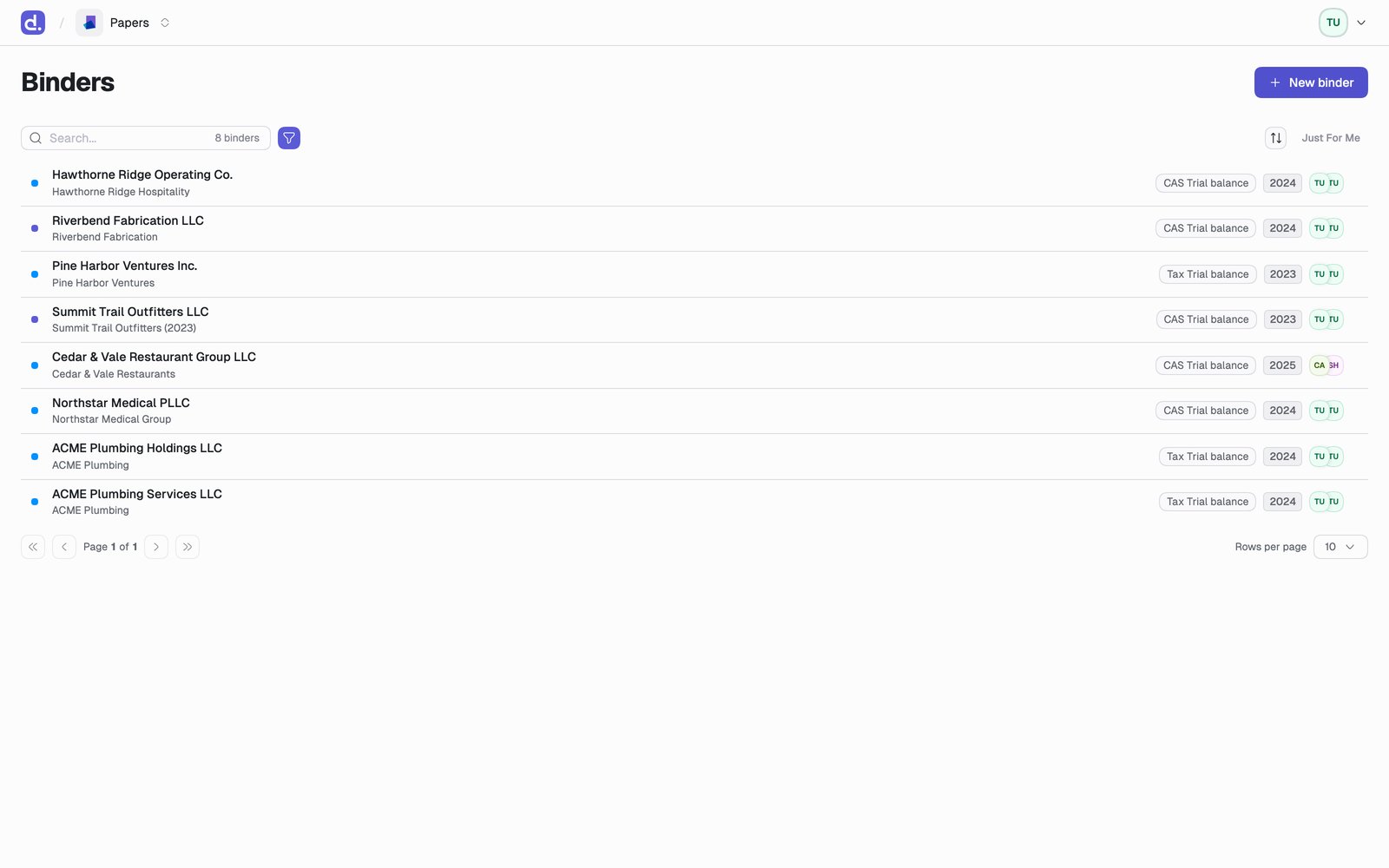
Click **Binders** in the navigation bar to see every binder you have access to. On a firm of any size that list is far too long to read, so the whole page is really three tools for cutting it down.
 ## Just For Me
The fastest cut, and the one to reach for first. Toggle **Just For Me** and the list drops to binders waiting on *you*, in priority order:
1. Binders where you're the **preparer** and the status is **In Progress**. Your queue.
2. Binders where you're the **reviewer** and the status is **Ready for Review**. What's waiting on your sign-off.
For most people on most days, this is the whole page.
## Filters
When you need something more specific, filter by any of:
| Filter | Values |
| - | - |
| **Status** | In Progress, Work Complete, Ready for Review, Complete |
| **Workflow** | 1099, CAS, Other, Payroll, Sales Tax, Tax |
| **Period Duration** | Week, Two Week, Month, Quarter, Half Year, Year |
| **Period End** | A date |
| **Basis** | Accrual, Cash |
| **Client Group** | Any group |
| **Client Entity** | Any entity |
| **Created At** | A date range |
| **Reviewer** | Any reviewer |
| **Preparer** | Any preparer |
Filters combine, so *Workflow: CAS* plus *Period End: 11/30* plus *Status: In Progress* is one month's close work across the firm.
## Keep the view
Your filters live in the page URL, so the view you built is a link. Bookmark it and you get it back in one click.
The views worth bookmarking are the ones you'd otherwise rebuild weekly:
* **Reviewer = you, Status = Ready for Review**: your review queue.
* **Preparer = you, Status = In Progress**: your prep queue.
* **Workflow = CAS, Period End = this month**: the whole close.
Bookmark instructions:
[Chrome](https://support.google.com/chrome/answer/188842) ·
[Edge](https://support.microsoft.com/en-us/microsoft-edge/add-a-site-to-my-favorites-in-microsoft-edge)
## Starting something new
**New binder** sits in the top right. The create menu in the nav bar does the same from anywhere in the app. See [Create a binder](/papers/create-binder).
If the entity already has last period's binder, don't start from scratch. [Roll it forward](/papers/roll-forward) and bring its documents and folders with it.
This documentation is built and hosted on [Mintlify](https://mintlify.com), a developer documentation platform.
## Just For Me
The fastest cut, and the one to reach for first. Toggle **Just For Me** and the list drops to binders waiting on *you*, in priority order:
1. Binders where you're the **preparer** and the status is **In Progress**. Your queue.
2. Binders where you're the **reviewer** and the status is **Ready for Review**. What's waiting on your sign-off.
For most people on most days, this is the whole page.
## Filters
When you need something more specific, filter by any of:
| Filter | Values |
| - | - |
| **Status** | In Progress, Work Complete, Ready for Review, Complete |
| **Workflow** | 1099, CAS, Other, Payroll, Sales Tax, Tax |
| **Period Duration** | Week, Two Week, Month, Quarter, Half Year, Year |
| **Period End** | A date |
| **Basis** | Accrual, Cash |
| **Client Group** | Any group |
| **Client Entity** | Any entity |
| **Created At** | A date range |
| **Reviewer** | Any reviewer |
| **Preparer** | Any preparer |
Filters combine, so *Workflow: CAS* plus *Period End: 11/30* plus *Status: In Progress* is one month's close work across the firm.
## Keep the view
Your filters live in the page URL, so the view you built is a link. Bookmark it and you get it back in one click.
The views worth bookmarking are the ones you'd otherwise rebuild weekly:
* **Reviewer = you, Status = Ready for Review**: your review queue.
* **Preparer = you, Status = In Progress**: your prep queue.
* **Workflow = CAS, Period End = this month**: the whole close.
Bookmark instructions:
[Chrome](https://support.google.com/chrome/answer/188842) ·
[Edge](https://support.microsoft.com/en-us/microsoft-edge/add-a-site-to-my-favorites-in-microsoft-edge)
## Starting something new
**New binder** sits in the top right. The create menu in the nav bar does the same from anywhere in the app. See [Create a binder](/papers/create-binder).
If the entity already has last period's binder, don't start from scratch. [Roll it forward](/papers/roll-forward) and bring its documents and folders with it.
This documentation is built and hosted on [Mintlify](https://mintlify.com), a developer documentation platform.