> ## Documentation Index
> Fetch the complete documentation index at: https://docs.denari.com/llms.txt
> Use this file to discover all available pages before exploring further.
# Account Reconciliation
> Reconcile trial balance accounts with supporting documents.
## Performing a reconciliation
Go to the **Trial balance** tab.
Find the account you wish to reconcile.
Click the **Reconcile account** button.
If the AI-suggested reconciliation (highlighted on the page) is correct, click **Approve Reconciliation**.
If incorrect, click **Reject**, then click the correct location on the document. If the value is on another document, click the document name on the right panel and then click the correct number.
If you cannot click the correct number, perform a [manual reconciliation](#manual-reconciliation).
## Manual reconciliation
Click the manual reconciliation icon.
On the document, drag a box around what you want to select (for PDFs) or click the correct cell (for Excel files).
In the **Manual Value** field below the **Suggested Value**, enter the correct number that you just highlighted.
## Reconciliation statuses
Each account on the trial balance has a reconciliation status indicating where it is in the tie-out process:
| Status | Description |
| ------------------------ | ----------------------------------------------------------------- |
| **N/A** | The trial balance has not been ingested yet |
| **Needs matches** | The account needs matching documents or blocks identified |
| **Needs reconciliation** | The account is ready to be reconciled |
| **Incomplete** | Reconciliation data is incomplete |
| **Needs review** | The account has been reconciled and is awaiting reviewer approval |
| **Immaterial** | The account has been marked as immaterial |
| **Ignored** | The account has been explicitly marked as ignored |
| **Reconciled** | The account has been successfully reconciled |
| **Excluded** | The account has been excluded from the reconciliation process |
## One-click reconciliation
The one-click reconciliation feature allows for faster trial balance tie-outs when the AI suggestion is correct.
## AI tie-out
Denari AI processes your uploaded workpapers to suggest reconciliations. The AI:
* Looks at the first three pages and the last two pages of each document
* Picks the value lowest on the page when multiple matches exist (to better detect totals)
* Considers the file name when making suggestions
* Learns from what you did in the last period
**Correct file naming is the most important thing you can do to assist the AI.** Name files descriptively — for example, "Fixed assets 053125.pdf" instead of "2014904.pdf" or "download.pdf".
## Parent/sub-account reconciliations
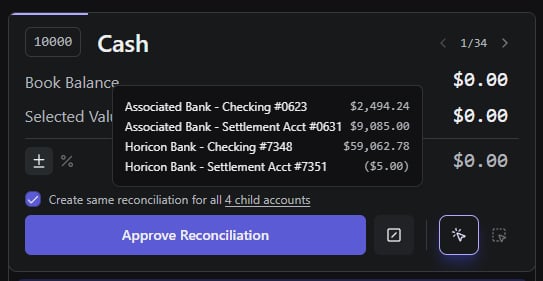
You can view sub-account values by hovering over the child accounts button on the reconciliation screen. Bulk remove all sub-account reconciliations at once using the bulk delete option.
 ## Workpaper difference
Workpaper difference is calculated using absolute values, so negative account balances with matching positive support will show a difference of zero.
## Workpaper difference
Workpaper difference is calculated using absolute values, so negative account balances with matching positive support will show a difference of zero.