> ## Documentation Index
> Fetch the complete documentation index at: https://docs.denari.com/llms.txt
> Use this file to discover all available pages before exploring further.
# The binder workspace
> The tabs across a binder, what each is for, and how a binder behaves when several people are in it.
Open a binder and everything lives behind one row of tabs. Which tabs you get depends on whether it's a [trial balance or workpaper-only binder](/papers/getting-started#two-shapes-of-binder).
## The header
Above the tabs sits the binder's identity: client group, client entity, binder type, and period, as a row of dropdowns. Each one is a switcher, not just a label. Use them to jump to another period or another binder for the same entity without going back to the list.
On the right are the binder's assignees and the **Submit for review** button. See [Submit for review](/papers/binder-reviews).
## The tabs
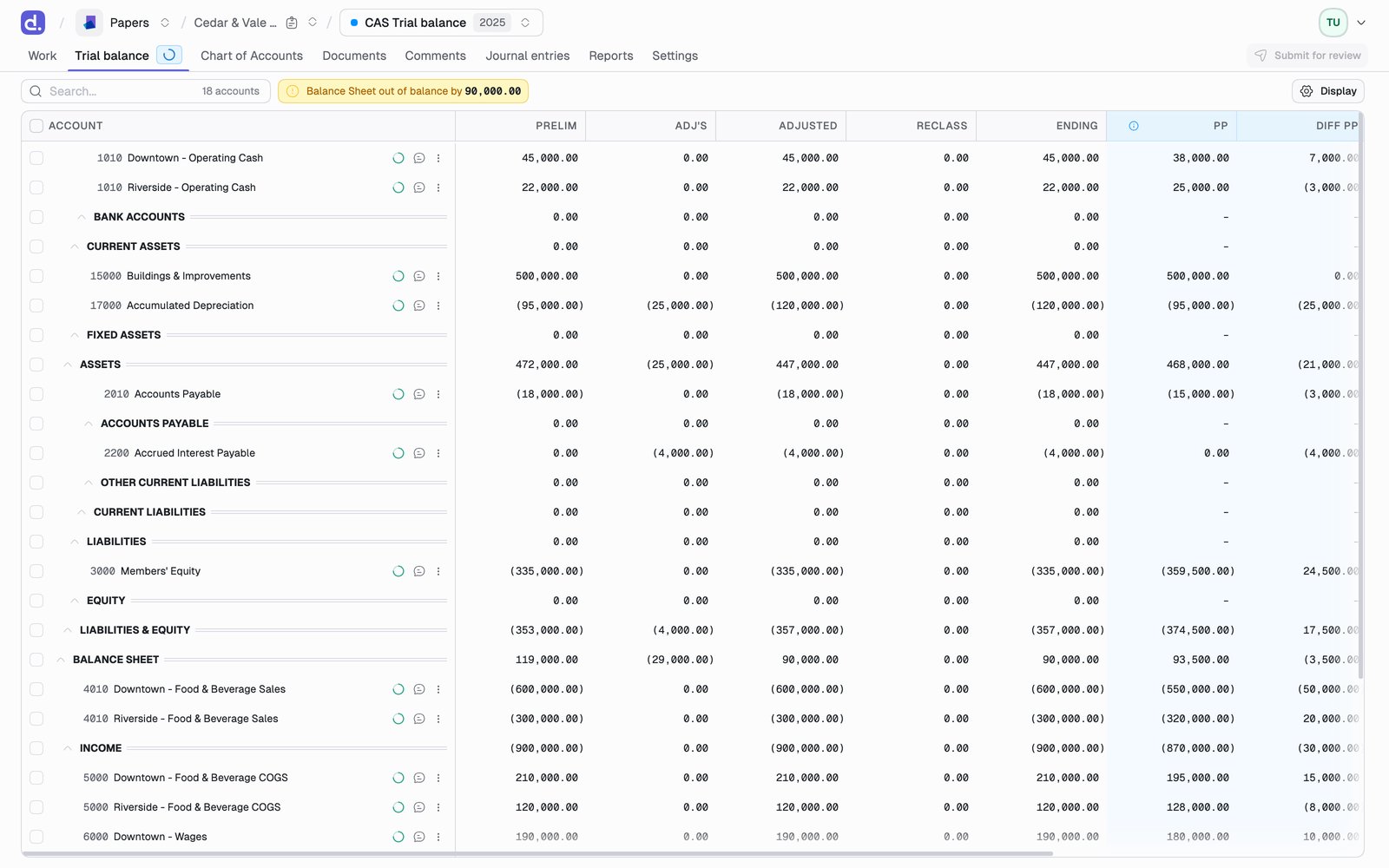 | Tab | For | Shown on |
| - | - | - |
| **Work** | The binder's checklist, the work to do | Every binder, if enabled |
| **Trial balance** | The account grid you tie out against | Trial balance binders |
| **Chart of Accounts** | Editing the accounts themselves | Trial balance binders |
| **Documents** | Workpapers and supporting files | Every binder |
| **Comments** | Notes and issues on the binder | Every binder |
| **Transactions** | QBO transaction detail | Trial balance binders, if enabled |
| **Journal entries** | Adjustments you post | Trial balance binders |
| **Reports** | Financials, budget, and class reporting | Trial balance binders, if enabled |
| **Settings** | Period, contributors, exports, lock | Every binder |
**Work**, **Transactions**, and **Reports** are behind feature flags, so your firm may not have them yet. **Work** sits first when it is on, because it is the list of what the binder still needs.
### Switching views of the trial balance
On a trial balance binder, **Go to** at the top right of the grid moves between the views of the same numbers:
* **Standard Trial Balance**
* **Tax Trial Balance**, on tax binders. See [Tax trial balance](/papers/tax-trial-balance)
* **Consolidated Trial Balance**, when the entity has subsidiaries. See [Reports](/papers/reports)
The same switcher sits in the top nav, so it's reachable from any tab. Either one hides whichever view you're already on.
## Working alongside other people
A binder is not a single-seat document. Denari keeps what you're looking at current without asking you to reload.
| What changes | When you see it |
| - | - |
| Your own change, in your other tabs | Immediately |
| Another person's change to the trial balance | Within about 15 seconds, on any open trial balance table |
| Workpaper ingestion and AI matching | Pushed as it happens. See [Reconcile an account](/papers/reconciliation#while-denari-is-reading-the-workpapers) |
Two tabs on the same binder stay in step, so you can keep the trial balance open in one window and a workpaper in another without one going stale behind the other. Signing out in any tab signs you out of the rest.
Trial balance tables refresh themselves while they are visible. A tab in the
background stops polling and catches up when you return to it, so a window you
left open overnight doesn't sit there re-querying.
This keeps data current; it is not simultaneous editing. Two people editing
the same journal entry at the same moment are still two people editing the
same journal entry, and the last save wins. Split the work by account or by
workpaper rather than by keystroke.
## Where things are
| Looking for | It's in |
| - | - |
| Importing or re-importing the trial balance | **Trial balance** tab on a new binder; **Settings** once one exists |
| Exports: financials, TB, journal entries, documents | **Settings** |
| Locking or deleting the binder | **Settings** |
| Adding yourself as preparer or reviewer | **Settings** |
| Rolling forward to next period | The binder-type dropdown in the header |
| Approving a document | Right-click it on **Documents** |
| Marking an account reviewed | The reconciliation screen for that account |
| Correcting an imported balance | **Chart of Accounts** |
This documentation is built and hosted on [Mintlify](https://mintlify.com), a developer documentation platform.
| Tab | For | Shown on |
| - | - | - |
| **Work** | The binder's checklist, the work to do | Every binder, if enabled |
| **Trial balance** | The account grid you tie out against | Trial balance binders |
| **Chart of Accounts** | Editing the accounts themselves | Trial balance binders |
| **Documents** | Workpapers and supporting files | Every binder |
| **Comments** | Notes and issues on the binder | Every binder |
| **Transactions** | QBO transaction detail | Trial balance binders, if enabled |
| **Journal entries** | Adjustments you post | Trial balance binders |
| **Reports** | Financials, budget, and class reporting | Trial balance binders, if enabled |
| **Settings** | Period, contributors, exports, lock | Every binder |
**Work**, **Transactions**, and **Reports** are behind feature flags, so your firm may not have them yet. **Work** sits first when it is on, because it is the list of what the binder still needs.
### Switching views of the trial balance
On a trial balance binder, **Go to** at the top right of the grid moves between the views of the same numbers:
* **Standard Trial Balance**
* **Tax Trial Balance**, on tax binders. See [Tax trial balance](/papers/tax-trial-balance)
* **Consolidated Trial Balance**, when the entity has subsidiaries. See [Reports](/papers/reports)
The same switcher sits in the top nav, so it's reachable from any tab. Either one hides whichever view you're already on.
## Working alongside other people
A binder is not a single-seat document. Denari keeps what you're looking at current without asking you to reload.
| What changes | When you see it |
| - | - |
| Your own change, in your other tabs | Immediately |
| Another person's change to the trial balance | Within about 15 seconds, on any open trial balance table |
| Workpaper ingestion and AI matching | Pushed as it happens. See [Reconcile an account](/papers/reconciliation#while-denari-is-reading-the-workpapers) |
Two tabs on the same binder stay in step, so you can keep the trial balance open in one window and a workpaper in another without one going stale behind the other. Signing out in any tab signs you out of the rest.
Trial balance tables refresh themselves while they are visible. A tab in the
background stops polling and catches up when you return to it, so a window you
left open overnight doesn't sit there re-querying.
This keeps data current; it is not simultaneous editing. Two people editing
the same journal entry at the same moment are still two people editing the
same journal entry, and the last save wins. Split the work by account or by
workpaper rather than by keystroke.
## Where things are
| Looking for | It's in |
| - | - |
| Importing or re-importing the trial balance | **Trial balance** tab on a new binder; **Settings** once one exists |
| Exports: financials, TB, journal entries, documents | **Settings** |
| Locking or deleting the binder | **Settings** |
| Adding yourself as preparer or reviewer | **Settings** |
| Rolling forward to next period | The binder-type dropdown in the header |
| Approving a document | Right-click it on **Documents** |
| Marking an account reviewed | The reconciliation screen for that account |
| Correcting an imported balance | **Chart of Accounts** |
This documentation is built and hosted on [Mintlify](https://mintlify.com), a developer documentation platform.