

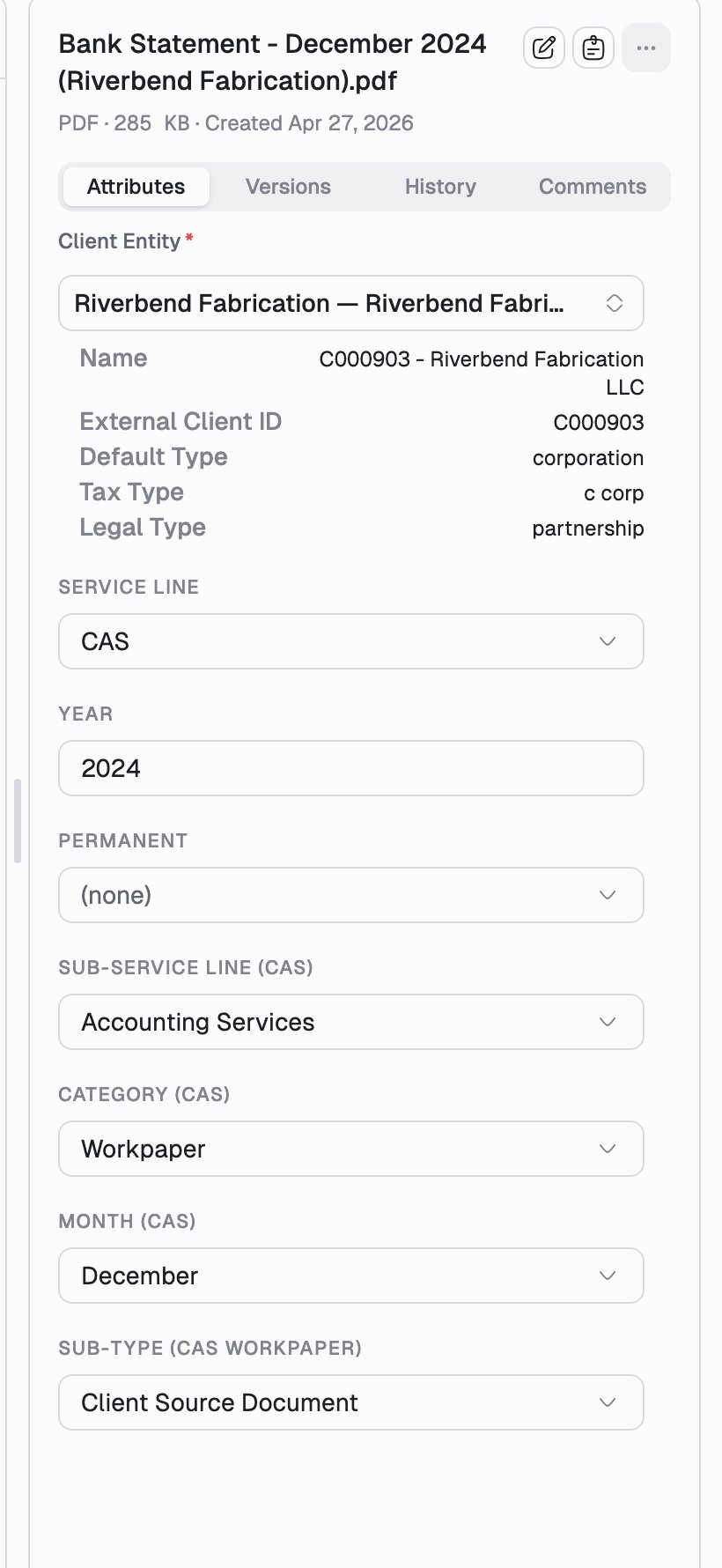
Edit them
1
Select the document
Attributes live on the Attributes tab of the details pane, on both the
list page and the document page.
2
Change the fields
Fields marked with a red asterisk are required. Picking a client entity
fills in its read-only details (external client ID, entity type, tax type)
below.
3
Click Save
A Save button appears at the bottom of the form as soon as something is
unsaved. Nothing is written until you click it.
Some fields cascade. Choosing a service line reveals the sub-service line,
category, and sub-type fields that belong to it, so the form only ever shows
fields that apply. A + badge next to a dropdown option tells you it will
add fields before you pick it.
Rename a document
Click the filename at the top of the details pane to rename it in place, or use Rename in the... actions menu. The extension is kept for you.
Good to know
- Attributes belong to the document, not to a version, so they carry across new versions and never need re-entering after a replacement upload. See Versions.
- The client entity is what decides which client portal a document can be published to, so it is worth getting right even on documents you don’t expect to share. See Publish a document.
- Saved changes flow through to search, grouping, and filters.
- If your firm is in a read-only or imported-content mode, the fields render but cannot be edited, and a banner at the top of Documents explains which actions are disabled.