

Create a new version
Two paths, both append a version and keep the old one:- Save in the editor.
- Upload new version in the
...actions menu of the details pane, to swap in a file prepared elsewhere.
Pending versions
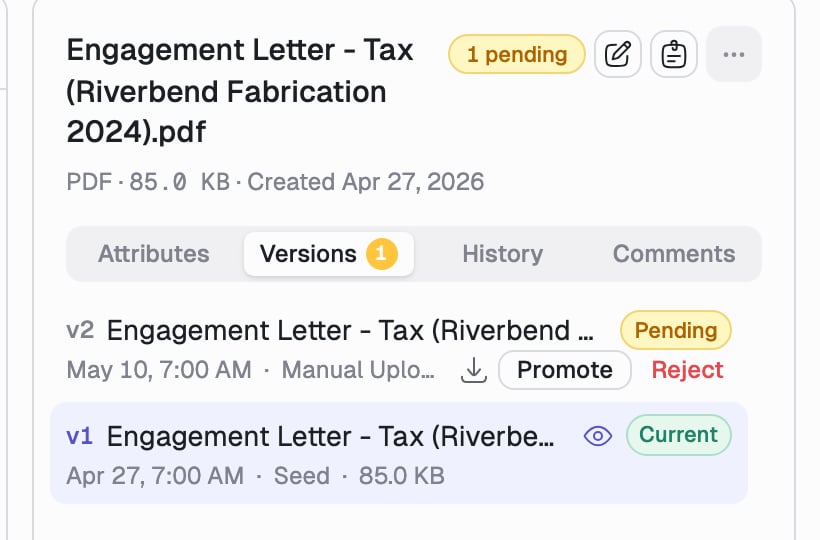
If someone uploads a replacement while the document is locked, it does not go live. It parks as a pending version for the lock holder to judge. You can spot pending work in three places: an amber dot on the document’s row in the list, a 1 pending chip in the details header, and a badge on the Versions tab.1
Open the Versions tab
Pending versions sit at the top, above the current one.
2
Promote or Reject
Promote makes it the current version. Reject sets it aside. Nothing
is auto-promoted; it is always your call.
Work with the history
Each row in the Versions tab gives you:- The eye icon to view that version in the previewer, without changing what is current.
- Download, to pull that exact file.
- Restore, on any superseded or rejected version. Restoring copies the old file forward as a new current version, so the history stays intact. A confirmation step guards it.
Attributes are properties of the document, not of a version. They carry across
new versions, so you never re-enter them after a replacement upload. See Edit
attributes.
Audit trail
The History tab beside Versions is the system of record: who viewed, edited, locked, or commented on the document, when, and from where.Deleting
Delete from the... actions menu, with a confirmation. Deletion is a soft delete: it retires every version, removes the document from search and from any client portals, and keeps the record so it can be recovered.