Answers can act in your connected systems: send an email, create an invoice, change who can see a document. Tool permissions decide which of those run freely, which pause for approval, and which are never allowed at all. The defaults are already sensible. Most firms never need to touch this page. It exists so that the ones who do can be precise about it.

Capabilities, not individual tools

Permissions are set per capability, not per tool. Your firm cares that sending email needs a sign-off, not that OUTLOOK_SEND_EMAIL specifically does. The last row matters more than it looks. Connector catalogs change without Denari shipping a release, so a brand new action has to land somewhere. It lands on the cautious side. When a single action matches more than one capability, the riskiest one wins. Moving a message to the trash is both an update and a delete, and it is treated as a delete.

The three modes

Allow

Runs without interruption.

Wait

The run pauses and you approve or deny that specific call.

Never Allow

The action is refused. Most tools are withheld from the model outright; Composio actions reach it through a shared meta tool, so those are refused when the call runs.

Approving an action

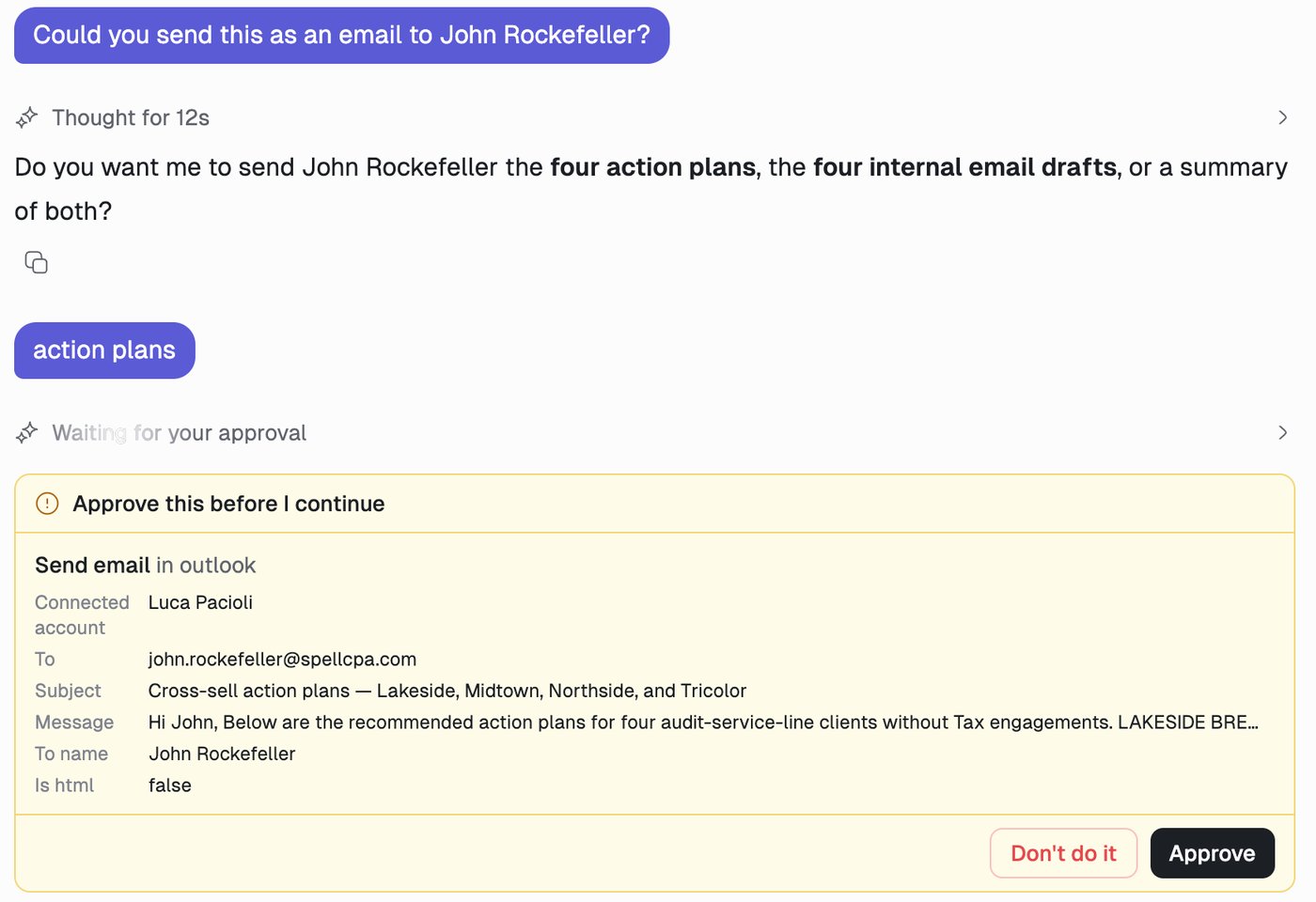
When a run hits something set to Wait, it pauses and shows an approval card inline, at the point in the answer where it stopped. A run paused on an approval card headed Approve this before I continue. The card reads Send email in outlook and lists the connected account, recipient, subject and message body, with Don't do it and Approve buttons. The card names the action (Send email in outlook) and lays out exactly what is about to happen: which connected account will do it, the recipient, the subject, and the message body. You can read the whole thing before anything leaves the building. Approve sends it; Don’t do it declines, and the agent is told it was refused and carries on without it. Note what happens before the card in the example above. Asked to email someone, Answers stopped to ask which of the things it had produced to send, rather than guessing. The approval card is the last gate, not the only one. If the agent queued several actions in one step, you get one card for the step. Identical actions are listed once with a count such as ×3, and one click decides all of them. Denying the step denies every action in it. Time spent waiting on you does not count as thinking time. The timer holds, and the turn reads Waiting for your approval. The card survives a page reload, and once the run finishes each step keeps its card showing the decision that was made, so the thread is a record of what was approved and by whom.
Who sets what

Firm admins set the firm’s defaults under Admin → Answers Tools, and can lock any row so no user can override it. Individual users adjust anything not locked, for themselves, on Answers → Connections → Tool permissions. A locked row is the right tool for the small number of things that are genuinely not a matter of personal preference. Everything else is better left adjustable.

MCP servers

MCP servers are governed per server rather than per connection, because MCP credentials belong to individual people and a firm default keyed to one person’s connection would never apply to anyone else. A newly connected server works straight away, with the capability defaults above deciding what it may do. Adding one is not a request that has to be granted. There is no approval queue for MCP servers. What an admin has is a block list: blocking a server for the firm withholds all of its tools and overrides any permission written while the server was trusted. Blocking also jumps straight to that server’s permission rows, which is usually where the admin wants to be next.

Scheduled runs

An automation has nobody to ask. Rather than parking a run on a prompt that will never be answered, a scheduled run withholds anything that would need approval. If an automation has to send or delete something, either set that capability to Allow for the connector involved, or design the automation to prepare the work and leave the final action to a person. The second option is usually the better trade.

Shared threads

A thread shared with a colleague is read-only for the recipient. They can read it, watch a live run and download its files. They cannot send messages, approve tool calls, stop the run, or upload or delete files, because those would run in your sandbox with your files and your credentials.